Sabtu, 08 Oktober 2016

Some Very Good Search Engines for Academics and Educators - Kang Khoe

In today's post I am sharing with you some interesting search engines ideal for folks in engaged in social science research.Researchers working in the fields of psychology, anthropology, and related subjects will find great results using these search engines.

Behavioral Brain Science Archive:


Check out this searchable archive to find extensive psychology and brain science articles.
In this research network, you can find a wide variety of social science research from a number of specialized networks including cognitive science, leadership, management, and social insurance.
Find a journal with Psycline’s journal and article locator, a tool that offers access to more than 2,000 psychology and social science journals online.

Search the languages of the world with Ethnologue, offering an encyclopedic reference of all the world’s known living languages. You’ll also be able to find more than 28,000 citations in the Ethnologue’s language research bibliography.
Use this site from the University of Amsterdam to browse sociological subjects including activism, culture, peace, and racism.
Check out this guide to find all of the sociological resources you’ll need on the internet. The SocioWeb offers links to articles, essays, journals, blogs, and even a marketplace.
With this custom Google search engine, you can find open access articles about archaeology.
Search or browse the Encyclopedia of Psychology to find basic information, and even translations for information about psychology careers, organizations, publications, people, and history.
Through this database, you can get access to anthropology reviews, look up publishers, and find resources available for review.
This anthropological online search includes both general search of 4,000 periodicals held in The British Museum Anthropology Library as well as Royal Anthropological Institute films.
Political Information is a search engine for politics, policy, and political news with more than 5,000 carefully selected websites for political information.

Source: Online Universities

Jumat, 07 Oktober 2016

This is How to Use Google Drive Offline - Kang Khoe

If you are a heavy Google Drive user like me you would probably love the offline service it provides. This is a feature that, when enabled, allow you to access , create and edit your Google docs and presentations offline. This is particularly useful when you want to access or edit a document in a place where there is no Internet. I have already shared a visual guide on how to activate the offline feature on Google Drive  in a post published last year but since Google released a new Drive interface a couple of days ago, I am updating you on the instructions on how to do it on the new Drive.

Follow the instructions below to enable the offline feature in your Drive and remember that Google Drive offline feature functions only in Chrome browser.

Here are the instructions for those of you who have updated to the new version of Google Drive.

1- Head over to your Drive account then click on the gear icon on top right hand side.
2- Click on setting


3- Check the box in front of offline.


These are instructions for those of you using the old version of Google Drive.

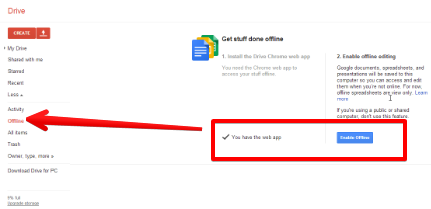
Log on to your Google Drive account and click on " more " menu


Click on " offline" .If you already have the Drive Chrome web app installed all you have to do is to click on " enable" .

A Very Good Collection of Educational Tools and Apps for Math Teachers - Kang Khoe

This is the seventh post in a series of posts featuring a number of EdTech charts for teachers.  Today's chart contains some very good resources for math teachers.  We have arranged these resources into 8 main categories: iPad math apps, Android math apps, Chrome math apps, Graphing calculator apps, Math games, calculator apps, and web-based tools for math teachers. You may want to bookmark this page for later reference. Enjoy


Categories
Apps
iPad Math Apps
Android Math Apps
Mac Math Apps
Chrome Math Apps
Web Tools for Math Teachers
Math Games
Math Calculator Apps
Graphing Calculators for Math Teachers

Kamis, 06 Oktober 2016

A Very Good Video Tutorial on How to Set Up A Flipped Classroom - Kang Khoe

Here is one of my favourite videos on flipped classroom. In this funny and insightful video, Keith Hughes explains the idea behind the flipped classroom and provides some excellent tips for teachers who want to integrate the flipped teaching methodology in their instruction. The video is a little bit long (24 minutes) but is really worth watching.

Flipped Classroom is an inverted method of instruction where teaching and learning take place online outside of the class while homework is done in the classroom. Advocators of this approach believe that this is the ideal method of instruction in our digital age. They basically build their judgement on the following facts :
  • Flipped Classroom shifts the learning responsibility and ownership from the teacher's hands into the students'.
  • Students tend to perform better when they control when, where and how they learn.
  • Teachers no longer dispense knowledge but rather guide and direct while students are the real active learners 
  • Teachers create animated videos and interactive lessons and lectures and students access them at home in advance of class even. In this way all students can re-watch the video tutorials whenever they want.
  • Classroom time can be geared towards data collection, collaboration, and application.
  • Class becomes a place for students to work through problems, advance concepts, and engage in collaborative learning.
  • Flipped Classroom also "allows teachers to reflect on and develop quality and engaging learning opportunities and options for internalization, creation, and application of content rather than just fluff or time filling assignments."
Watch the video below to learn how to set up a flipped learning classroom


Follow us on : Twitter, Facebook , Google plus, Pinterest .

A New Google Tool for Music Teachers - Kang Khoe

October 6, 2016
Google’s popular app Science Journal has recently added an interesting feature called Light Instruments which is basically an activity that enables students ‘to design and build a musical instrument played by changing the light that reaches it’. the instruments are constructed from light sensors connected to external bluetooth devices which ‘when connected to the Science Journal app, will shoe the sensor’s value and change as the levels of light do, and produce different notes through the graph signification’.

More importantly, students with visual impairment can now use the app to easily translate graphs into musical notes. Commenting on this new feature, Google states that When they first shared this feature with their partners at the Exploratorium, ‘they saw more than an accessibility tool for users with low vision. As believers in “low floor / high ceiling” learning experiences (where users can enter at any background level and continue to learn and grow within the experience), they saw graph sonification as a way for kids with little-to-no experience analyzing graphs to start developing graph literacy and understanding data trends, lowering the “floor” for kids to do scientific exploration.’

Watch the video below to learn more about Light Instruments


Watch this video to learn more about sonification feature


Rabu, 05 Oktober 2016

Four Important Google Drive Updates Teachers Should Know about - Kang Khoe

October 5, 2016
Google has recently changed the name of its popular service Google Apps for Education to  G Suite for Education. With this change comes a bunch of new features that have been added to some of apps included in the G Suite for Education. These features use machine intelligence to facilitate and add more functionalities to Google Apps. Below is a quick overview of the main updates in this regard:

google drive updates
1- Google Sheets
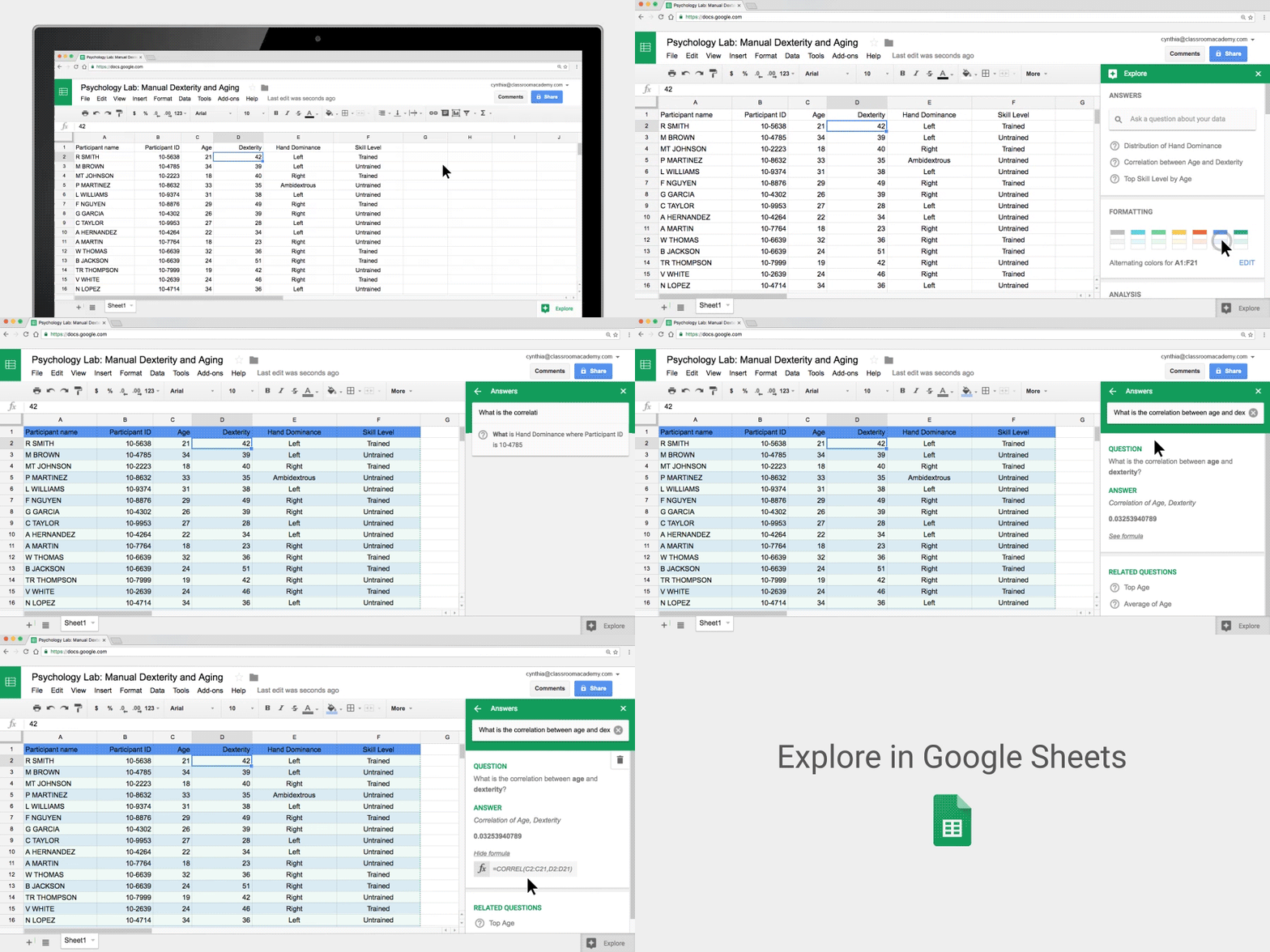
Explore in Google Sheets is a new feature added to Google Sheets to allow students to create smarter sheets. Explore makes it easy for students to ‘summarize spreadsheet data with automated charts and insights’. Students who can’t write formulas can now use Explore to instantly convert questions into formula. ‘Students can simply enter a question using natural language and Explore in Google Sheets will use Natural Language Processing to translate the question into a formula and offer an instant answer.’

2- Google Docs
Explore has also been added to Google Docs bringing with it a number of features such as the ability to search for and find related documents from Drive, automatic recommended topics to learn about, and for educators, the ability to conduct image searches and get results limited to those that ‘comply with SafesSearch and are approved to use with Creative Commons’.

3- Google Slides
Explore in Google Slides brings new features to help students create polished presentations. Explore offers a number of layout suggestions to help students better format their slides.

4- Google Calendar
‘Google Calendar uses machine intelligence to help you easily find a time when invitees are free, and it also suggests available rooms based on your previous bookings. And, when the list of invitees grows long and no times are available, Calendar will suggest times across the group where the conflicts are easiest to resolve, such as recurring 1:1 meetings’.

Selasa, 04 Oktober 2016

3 Great Tools for Creating Educational Whiteboard Animated Videos - Kang Khoe

Whiteboard animation videos are videos that draw themselves. They involve an animated use of images, shapes, characters, sounds and voice-overs to create a clip. This form of video production has been very popular recently and is widely used by some leading educational YouTube channels such as TED Ed and RSA Animate. Creating a whiteboard animation video is no longer a graphic designer's job. There are actually several web tools that allow you to easily put together an animated video with as simple tools as drag and drop. As a teacher, you can  use these animations to create and share tutorials,  presentations, step by tsp guides, and many more. Below are three  of my favourite tools I would recommend for you:

1- GoAnimate
Go Animate allows you to produce your own professional whiteboard animation-style video using your mouse and your favorite internet browser on GoAnimate! The Whiteboard Animation theme includes thousands of hand-drawn assets like props and backgrounds, plus hundreds of character actions that fit a wide variety of professions and business settings. Whenever you add a whiteboard animation prop, background, or character in a scene, this asset will appear to be drawn by a hand holding a marker pen in the final video. No extra action required. But that’s not all. You can also easily adjust the image by changing its timing and adding a delay to better fit the video’s script.

Watch this video to learn more about GoAnimate


2- Video Scribe
VideoScribe empowers you to create your own whiteboard-style animated videos without any design or technical know-how. All you need is a message, an idea, or something to communicate to the world. VideoScribe makes animated sketches out of the images you choose. Place text and drawings onto a canvas, add a voiceover or soundtrack – then sit back and watch your story unfold.

Watch this video to see how Video Scribe works


3- PowToon
PowToon is aother great web tool that enables you to create powerful video animations and presentations. PowToon provides you with all the necessary animation tools you’ll need to immediately begin creating your own professional-looking animated explainer videos and animated presentations. From start to finish, you’ll be guided through a surprisingly simple process. Watch the video below to learn more about PowToon.


 Follow us on : Twitter, Facebook , Google plus, Pinterest .