Tampilkan postingan dengan label Google Drive updates. Tampilkan semua postingan

Rabu, 16 November 2016

A New Great Feature for Google Drive Users - Kang Khoe

November 16, 2016
Google introduced today a new feature for G Suite (formerly Google Apps for Work). The new custom template feature allows users to submit and share custom template files for Docs, Sheets, forms and Slides. When submitted to shared template galleries, other users (e,g co-workers) can use these custom templates and adapt them the way they want. Admins in G Suite for Education have the right to pre-approve and limit who can submit custom templates.
You can use the custom template gallery if your Google Account is through work or school. This is how to see your work or school templates:

A New Important Google Drive Feature

  • Open a Google Docs, Sheets, Slides, or Forms home screen.
  • Click TEMPLATE GALLERY.
  • Make sure the tab with your organization's name is selected.
  • To use a template, click it.
This is how to submit a template to the gallery:
  • Open a Google Docs, Sheets, Slides, or Forms home screen.
  • Click TEMPLATE GALLERY.
  • Click Submit template and then Select a document.
  • Click the file you want to add, then click Select. You can also choose to use a copy of the document as the template.
  • Choose a category, then click Submit. Your template will be submitted to the gallery.
Source: Docs Editors Help

Senin, 14 November 2016

What Teachers Need to Know about The Integration of Google Drive in Evernote - Kang Khoe

November 14, 2016
Following a question we received from one of our readers regarding sharing files between Evernote and Google Drive, we thought it useful to share with you this reminder. A few months ago, Google Drive and Evernote announced a collaborative partnership that resulted in the integration of Google Drive in Evernote notebooks. The purpose is to provide users with an intuitive and rich experience to enhance their productivity by allowing them  to focus more on their thinking and writing without the disruption caused by switching apps.


With this integration, Google Drive content is now available at Evernote. This means that you can add files from your Drive to your Evernote notes and any changes you make to these files in Google Drive will be automatically updated in Evernote. ‘This integration opens the door for millions of Google Drive customers to experience the power of Evernote. Use Google Drive to store your ideas, memories, and work. Then, take advantage of Evernote’s powerful organizational features to make sense of them all and inspire new ideas. “Once people see how well Evernote and Google Drive work together, they’ll use both products intuitively,” says Evernote CEO Chris O’Neill. “For Evernote enthusiasts, this is a natural progression. Google is organizing the world’s information, and now Google Drive and Evernote are helping you do just that with your information.”

Watch the video below to learn more about Google Drive integration with Evernote


Image source: Evernote Blog

 Follow us on : Twitter, Facebook , Google plus, Pinterest .

Rabu, 05 Oktober 2016

Four Important Google Drive Updates Teachers Should Know about - Kang Khoe

October 5, 2016
Google has recently changed the name of its popular service Google Apps for Education to  G Suite for Education. With this change comes a bunch of new features that have been added to some of apps included in the G Suite for Education. These features use machine intelligence to facilitate and add more functionalities to Google Apps. Below is a quick overview of the main updates in this regard:

google drive updates
1- Google Sheets
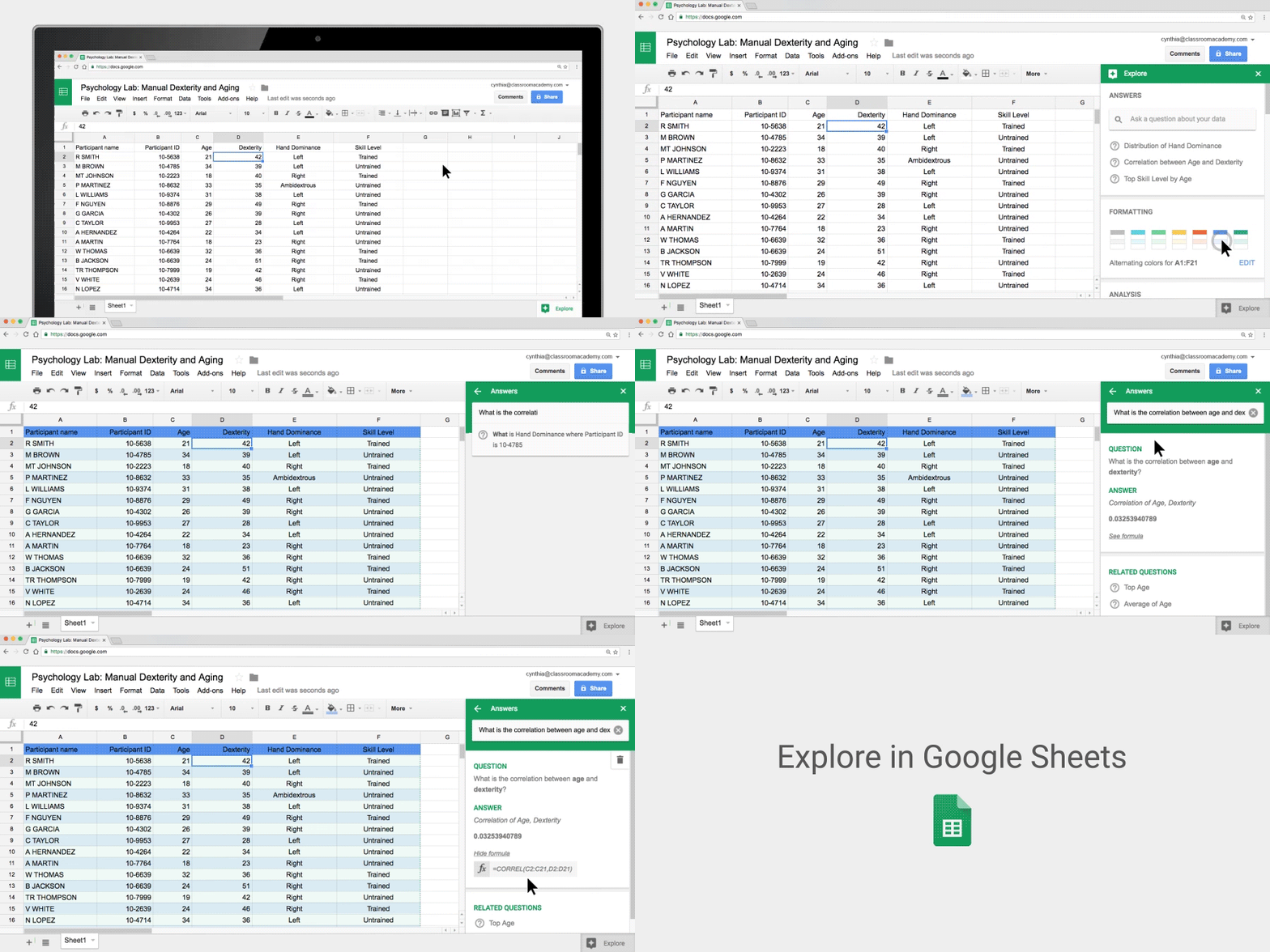
Explore in Google Sheets is a new feature added to Google Sheets to allow students to create smarter sheets. Explore makes it easy for students to ‘summarize spreadsheet data with automated charts and insights’. Students who can’t write formulas can now use Explore to instantly convert questions into formula. ‘Students can simply enter a question using natural language and Explore in Google Sheets will use Natural Language Processing to translate the question into a formula and offer an instant answer.’

2- Google Docs
Explore has also been added to Google Docs bringing with it a number of features such as the ability to search for and find related documents from Drive, automatic recommended topics to learn about, and for educators, the ability to conduct image searches and get results limited to those that ‘comply with SafesSearch and are approved to use with Creative Commons’.

3- Google Slides
Explore in Google Slides brings new features to help students create polished presentations. Explore offers a number of layout suggestions to help students better format their slides.

4- Google Calendar
‘Google Calendar uses machine intelligence to help you easily find a time when invitees are free, and it also suggests available rooms based on your previous bookings. And, when the list of invitees grows long and no times are available, Calendar will suggest times across the group where the conflicts are easiest to resolve, such as recurring 1:1 meetings’.