November 8, 2016
Today’s collection features some interesting iPad apps for music teachers.They can be used with students to create and share beautiful songs and tracks. Think of them like simplified music studios with a number of excellent features and tools that make music creation simpler and more engaging. Most of these apps allow you to shared your final products through social media websites, direct links, emails or upload them to music hosting sites such as SoundCloud. Enjoy
1- Blocs Wave - Make & Record Music
‘Blocs Wave is a powerful and beautifully designed music app for making and recording new music quickly. For songwriters and electronic music makers alike, it is an on-the-move portable music studio. Start new musical ideas by discovering new sounds across genres. Make your tunes unique by slicing and rearranging your sounds. Play with beautiful touchable waveforms and build up loops in real-time by recording your voice or other sounds, and build bigger ideas using song sections. Blocs Wave is also great for live looping, thanks to its real-time stretch and pitch engine.’
2- Keezy
‘Keezy is a musical instrument for toddlers, professional musicians, and everyone in between! You get 8 colored tiles. You can record a sound into each one. After recording, tap the tile to play it back, or press & hold to loop. Once you've got it down, record a jam to share with your friends!’
3- NOIZ
‘NOIZ re-imagines how you make music. No longer do you need years of training or a multimillion dollar studio to produce a dance-floor hit. NOIZ gives everyone the power to create amazing music…Touch and drag shapes on the beautiful graphic interfaces to trigger beats, fills and effects to create dramatic drops and dynamic build ups.’
4- Medly - Music Maker
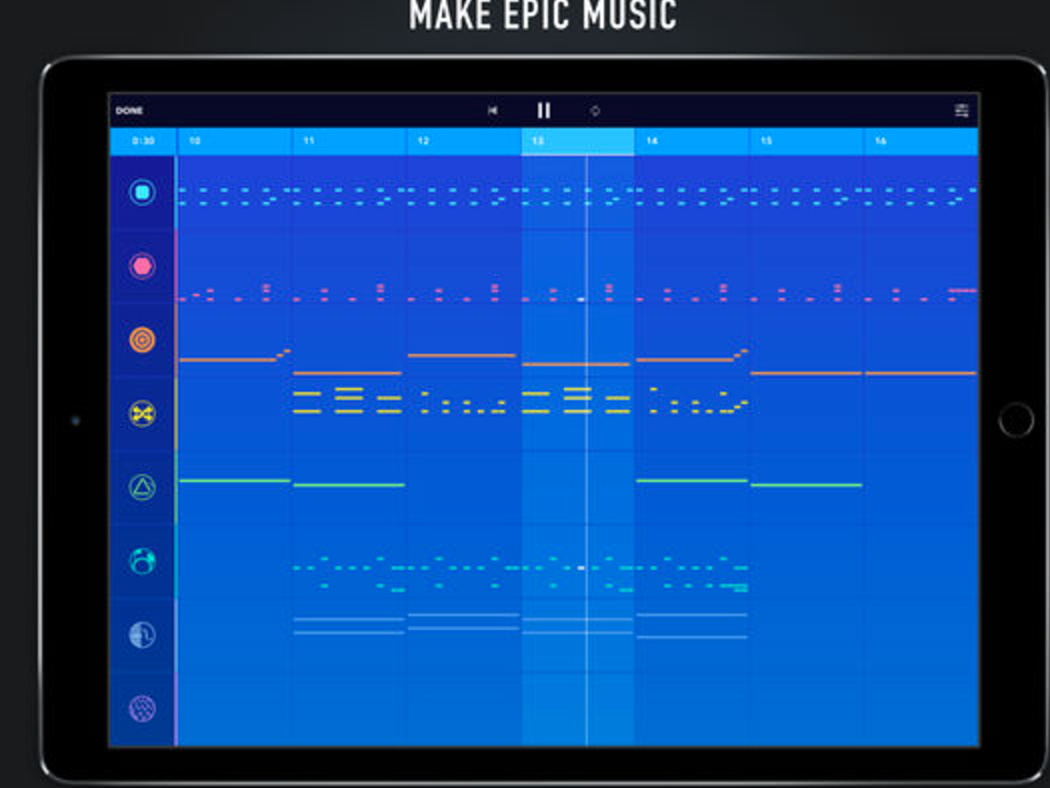
‘Medly takes a new approach to the way music is made, letting both seasoned and new musicians make epic music. Just pick your instruments and start drawing notes…Medly breaks up your song into Sections that you can easily pick up, move, delete, copy, and link together to make loops. Then arrange your Sections, using up to 8 instrument tracks, to make epic music.’
5- Jam Looper- Music Maker
‘A simple and fun way to create music.Featuring smart automatic looping, multiple channels and volume controls.Meticulously designed as a seamless experience that lets you just jam while we take care of the rest. You can beatbox, loop guitar riffs or beats and then add vocals or harmony to it.’
6- Visual Beat - Interactive Music Video
‘Create your own composition with the interactive music video Visual Beat! Conduct different musicians by mixing their versatile instruments and vocals. Explore hand-crafted stop motion animations matching with each musicians' specific style of music. Experiment with the repertoire of soundtracks to get various result’
Courtesy of Product Hunt
Senin, 07 November 2016
8 New Educational Web Tools and Apps for Teachers - Kang Khoe
November 7, 2016
We spent sometime sifting through the piles of new web tools and mobile apps featured in Product Hunt and selected for you the titles below. The purpose is twofold: keep you updated about the latest releases in the world of educational technology and provide you with new tools to incorporate in your teaching and learning. We hope you find the collection helpful. Enjoy
1- LightSail
This is a digital literacy technology helping K-12 students to learn – and love – to read. It builds in the Lexile assessment to thousands of books, helping students and teachers get real time feedback on the reader’s progress, helping to assure the student has just the right book for her ability. It also allows for in-text annotations and links to a closed online group for class discussion, among other features.
2- Formittan
‘A powerful cloud based form builder tool for creating online web forms. It is so simple that in a matter of minutes you can create your form and start using it. It requires no programming skills - Titan does it all for you. FormTitan enables you to create an endless array of forms: contact forms, feedback forms, order forms, purchase forms, online invitations, surveys and polls etc.’
3- Sortd
Sortd is a good tool to use with your Gmail. It enhances your Gmail experience, providing a seamless, intuitive way to plan and prioritise email and tasks in a single Gmail workspace.
4- Algebra Rules
‘Here are a few very handy rules of algebra. These basic rules are useful for everything from figuring out your gas mileage to acing your next math test — or even solving equations from the far reaches of theoretical physics. Happy calculating!’
5- Musixmatch
‘Musixmatch is the world’s largest lyrics platform - where you can search, enjoy, and share lyrics from any track, anywhere in the world. Musixmatch’s lyrics catalogue is created, synched, and translated by millions of contributors from the Musixmatch community. The final version of the lyrics is edited and validated by a team of international curators. Users can connect Musixmatch with Spotify, Apple Music, and dozens of other music services to enjoy lyrics synchronized to the music.’
6- ThoughtPad
‘ThoughtPad is an auto-saving online notepad. Whatever you type is autosaved in your browser. You can Email or download your content as well.’
7- Chordify
‘Chordify is your #1 platform for chords. We help musicians of all levels to learn and play the music they love. Simple. Fast. Accurate. Chordify gives you the chords for any song and aligns them to the music in a simple to use player.’
8- Melodist
‘Melodist, a magic music app that composes a unique melody for every single photo.By analyzing the changes in hues, saturation and brightness, Melodist generates the mode, scale, chord progression and melody automatically, turning every photo into a piece of beautiful music. Elegant animation carrying the emotion of the music is also displayed when playing the music. Combining image, music and animation, Melodist creates a brand-new multi-media art form.’
We spent sometime sifting through the piles of new web tools and mobile apps featured in Product Hunt and selected for you the titles below. The purpose is twofold: keep you updated about the latest releases in the world of educational technology and provide you with new tools to incorporate in your teaching and learning. We hope you find the collection helpful. Enjoy
1- LightSail
This is a digital literacy technology helping K-12 students to learn – and love – to read. It builds in the Lexile assessment to thousands of books, helping students and teachers get real time feedback on the reader’s progress, helping to assure the student has just the right book for her ability. It also allows for in-text annotations and links to a closed online group for class discussion, among other features.
2- Formittan
‘A powerful cloud based form builder tool for creating online web forms. It is so simple that in a matter of minutes you can create your form and start using it. It requires no programming skills - Titan does it all for you. FormTitan enables you to create an endless array of forms: contact forms, feedback forms, order forms, purchase forms, online invitations, surveys and polls etc.’
3- Sortd
Sortd is a good tool to use with your Gmail. It enhances your Gmail experience, providing a seamless, intuitive way to plan and prioritise email and tasks in a single Gmail workspace.
4- Algebra Rules
‘Here are a few very handy rules of algebra. These basic rules are useful for everything from figuring out your gas mileage to acing your next math test — or even solving equations from the far reaches of theoretical physics. Happy calculating!’
5- Musixmatch
‘Musixmatch is the world’s largest lyrics platform - where you can search, enjoy, and share lyrics from any track, anywhere in the world. Musixmatch’s lyrics catalogue is created, synched, and translated by millions of contributors from the Musixmatch community. The final version of the lyrics is edited and validated by a team of international curators. Users can connect Musixmatch with Spotify, Apple Music, and dozens of other music services to enjoy lyrics synchronized to the music.’
6- ThoughtPad
‘ThoughtPad is an auto-saving online notepad. Whatever you type is autosaved in your browser. You can Email or download your content as well.’
7- Chordify
‘Chordify is your #1 platform for chords. We help musicians of all levels to learn and play the music they love. Simple. Fast. Accurate. Chordify gives you the chords for any song and aligns them to the music in a simple to use player.’
8- Melodist
‘Melodist, a magic music app that composes a unique melody for every single photo.By analyzing the changes in hues, saturation and brightness, Melodist generates the mode, scale, chord progression and melody automatically, turning every photo into a piece of beautiful music. Elegant animation carrying the emotion of the music is also displayed when playing the music. Combining image, music and animation, Melodist creates a brand-new multi-media art form.’
Minggu, 06 November 2016
4 Great Avatar Creation Apps for Teachers and Students - Kang Khoe
November 6, 2016
An avatar is a visual representation of an imagined or real character. Since their introduction a few years ago, avatars have been widely used for a variety of teaching and learning purposes. From building communities in the classroom and enhancing students social learning to using avatars to gain real-world experience and develop problem solving skills through virtual games and simulations, avatars have a huge potential in education. In today’s post we are sharing with you a number of interesting iPad apps you can use in your instruction to create different kinds of avatars.
1- 3D Avatar Creator
‘Create and save avatars of friends and family. Play dress up and make mini-me, or amazing chibi, goth, emo, vampire or superhero characters. Change hairstyle, eye shape, clothing, and lots more. Buy in-app expansion packs for coats, hats, caps and masks. Share and collect avatars using QR Codes. Send mood emoticons and friendship animations of your avatars as animated gif emoji to friends by email, Facebook, Weibo, WeChat, Instagram and Twitter.’
2- Cute Avatar Creator
‘Cute Avatar Creator is an app you can use to create tons of cute characters. Make a character to represent you, your family, and your friends! You can then use the cute avatar you have created as your profile picture on websites such as Facebook, Instagram or many other websites you might use. You can also assign the avatar to your contacts on your device.’
3- WeeMee Avatar Creator
‘Create and share unlimited WeeMees with the WeeMee Avatar Creator! Makeover anyone from yourself, your friends and family, or even your favorite celebrity! Try out the latest fashions, hair, make-up, and more to get the perfect look. Enter your finished WeeMee into Fame Game for the chance to win prizes! In-app purchases included.’
4- Myidol- 3D Avatar Creator
‘Using 3D facial recognition technology, Myidol enables you to create your unique avatar. You can adjust skin color, hairstyle, eye tone, and add a mustache to make your avatar look more like you; you can dress up with clothes, accessories, and even face paints; you can choose an action for it to perform.’
An avatar is a visual representation of an imagined or real character. Since their introduction a few years ago, avatars have been widely used for a variety of teaching and learning purposes. From building communities in the classroom and enhancing students social learning to using avatars to gain real-world experience and develop problem solving skills through virtual games and simulations, avatars have a huge potential in education. In today’s post we are sharing with you a number of interesting iPad apps you can use in your instruction to create different kinds of avatars.
1- 3D Avatar Creator
‘Create and save avatars of friends and family. Play dress up and make mini-me, or amazing chibi, goth, emo, vampire or superhero characters. Change hairstyle, eye shape, clothing, and lots more. Buy in-app expansion packs for coats, hats, caps and masks. Share and collect avatars using QR Codes. Send mood emoticons and friendship animations of your avatars as animated gif emoji to friends by email, Facebook, Weibo, WeChat, Instagram and Twitter.’
2- Cute Avatar Creator
‘Cute Avatar Creator is an app you can use to create tons of cute characters. Make a character to represent you, your family, and your friends! You can then use the cute avatar you have created as your profile picture on websites such as Facebook, Instagram or many other websites you might use. You can also assign the avatar to your contacts on your device.’
3- WeeMee Avatar Creator
‘Create and share unlimited WeeMees with the WeeMee Avatar Creator! Makeover anyone from yourself, your friends and family, or even your favorite celebrity! Try out the latest fashions, hair, make-up, and more to get the perfect look. Enter your finished WeeMee into Fame Game for the chance to win prizes! In-app purchases included.’
4- Myidol- 3D Avatar Creator
‘Using 3D facial recognition technology, Myidol enables you to create your unique avatar. You can adjust skin color, hairstyle, eye tone, and add a mustache to make your avatar look more like you; you can dress up with clothes, accessories, and even face paints; you can choose an action for it to perform.’
7 Must Watch TED Talks on Bullying - Kang Khoe
November 6, 2016
Sometimes the very saddening traumas people go through become their main drive to transform their lives and pursue a successful life path. Stories of successful people who were once the subject of traumatized experiences in their past and came out of it stronger abounds. From Eistein’s dejected childhood to Thomas Edison’s repeated failures, the list of successful people who have turned their weaknesses into strengths is huge. Such stories bring hope and optimism and communicate one single message that no matter how hard the setbacks and obstacles facing you in life you should never give up.
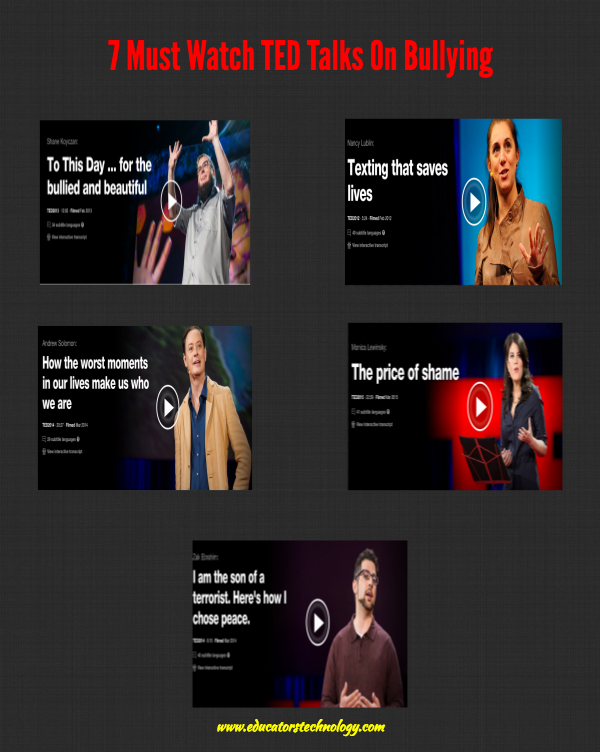
Bullying is an example of a serious problem that sometimes can have destructive consequences on a person’s life but again there are a lot of people who have come out of it much stronger and with more resolute determination to live happier life. The TED talks we are sharing with you today shed more light on bullying and feature some amazing stories of people who have dealt with and defeated bullying in their life. Check them out and share with your students.
1-To This Day ... for the bullied and beautiful
2- I am the son of a terrorist. Here's how I chose peace
3- How the worst moments in our lives make us who we are
4- The price of shame
5- Texting that saves lives
Sometimes the very saddening traumas people go through become their main drive to transform their lives and pursue a successful life path. Stories of successful people who were once the subject of traumatized experiences in their past and came out of it stronger abounds. From Eistein’s dejected childhood to Thomas Edison’s repeated failures, the list of successful people who have turned their weaknesses into strengths is huge. Such stories bring hope and optimism and communicate one single message that no matter how hard the setbacks and obstacles facing you in life you should never give up.
Bullying is an example of a serious problem that sometimes can have destructive consequences on a person’s life but again there are a lot of people who have come out of it much stronger and with more resolute determination to live happier life. The TED talks we are sharing with you today shed more light on bullying and feature some amazing stories of people who have dealt with and defeated bullying in their life. Check them out and share with your students.
1-To This Day ... for the bullied and beautiful
2- I am the son of a terrorist. Here's how I chose peace
3- How the worst moments in our lives make us who we are
4- The price of shame
5- Texting that saves lives
Sabtu, 05 November 2016
4 Interesting Educational iPad Apps Free Today - Kang Khoe
November 5, 2016
In this week’s Apps Gone free series we are sharing with four excellent education apps to use with your students for a variety of educational purposes. Some of the things you can do with these apps include : convert your pictures into awesome canvas paintings, easily create visual to-do lists, tasks and reminders; provide kids with a collection of amazing interactive games and learning activities based on the popular teaching methods of Montessori and Shchida; develop kids mathematical skills through a series of engaging games and activities.
1- Artprint - Personalized Canvas Christmas Gift
‘Transforms your photo into various artistic canvas paintings and receive it at your doorstep! Use the app to transform photo of memorable moment (couple, children, pet, building and scenery) into drawing. Get it printed by us and hang it as decor at your home. All could be done easily with few tap.’
2- Cuecard - Visual To-Do List, Tasks and Reminders
‘Cuecard is the fastest and easiest way to remember your tasks - simple, fun and way more effective than text based reminders! To remember your task, simply choose one of the beautifully crafted built-in Cues as a visual reminder.’
3- A Parcel of Courage book for kids with puzzles
"A Parcel of Courage" is a highly interactive graphic book app for preschoolers, filled with robust learning activities and unique educational games based on two proven teaching methods: Montessori method and Shichida method. Many interactive activities within the heartwarming story are paired to reinforce the storyline so that kids can better comprehend the content and improve their spatial orientation, listening skills, and visual-motor skills.’
4- Division Flashcard Match Games for Kids
In this week’s Apps Gone free series we are sharing with four excellent education apps to use with your students for a variety of educational purposes. Some of the things you can do with these apps include : convert your pictures into awesome canvas paintings, easily create visual to-do lists, tasks and reminders; provide kids with a collection of amazing interactive games and learning activities based on the popular teaching methods of Montessori and Shchida; develop kids mathematical skills through a series of engaging games and activities.
1- Artprint - Personalized Canvas Christmas Gift
‘Transforms your photo into various artistic canvas paintings and receive it at your doorstep! Use the app to transform photo of memorable moment (couple, children, pet, building and scenery) into drawing. Get it printed by us and hang it as decor at your home. All could be done easily with few tap.’
2- Cuecard - Visual To-Do List, Tasks and Reminders
‘Cuecard is the fastest and easiest way to remember your tasks - simple, fun and way more effective than text based reminders! To remember your task, simply choose one of the beautifully crafted built-in Cues as a visual reminder.’
3- A Parcel of Courage book for kids with puzzles
"A Parcel of Courage" is a highly interactive graphic book app for preschoolers, filled with robust learning activities and unique educational games based on two proven teaching methods: Montessori method and Shichida method. Many interactive activities within the heartwarming story are paired to reinforce the storyline so that kids can better comprehend the content and improve their spatial orientation, listening skills, and visual-motor skills.’
4- Division Flashcard Match Games for Kids
‘Building math skills and learning to divide has never been more fun and intuitive! With "Show Me" and "Peek" features, play comes easy even for young learners.This app adheres to Common Core Standards for third grade math and was designed by parents and teachers.’
Source: Apps Gone Free
4 Excellent iPad Apps for Creating Educational Comic Strips - Kang Khoe
November 5, 2016
Below are some very good iPad apps you can use with your students in class to create educational comic strips. Students can use them to work on writing projects, engage in storytelling activities , photo journalling and many more. The apps are very simple to install, easy to use and students will absolutely love them. Check them out and share with your colleagues. Enjoy
1- Comic Puppets Lite
‘ComicPuppets for iPhone and iPad provides you with all the tools to express your creativity.
Join the community of "comic puppeteers" too by using the vast gallery of characters and backgrounds, or by creating new ones with your own photos. You decide the ideal position of the character: thanks to the joints of the limbs, this will be easy and funny. Then add wigs, hats, expressions and objects. Fill the balloons in with jokes, wishes for a Merry Christmas or a happy birthday.’
2- Comic Life 3
‘Packed with fonts, templates, balloons, captions, and lettering art, Comic Life is a fun, powerful and easy-to-use app that makes creating comics easier than ever. And now you can build your comics anywhere you like! Easily go from taking photos to creating full comics all on one device with full page templates and panel layouts. Create original stories with the integrated Script Editor then drag and drop your words to the comic page when you're done.’
3- Pixton Cmic Maker
‘Choose a background and characters, add speech bubbles, and you're done! Or, use Pixton in advanced mode and control every element of your comic.’
4- Comics Head
‘The App is an easy to use comic creator and a self-publishing tool that lets you to create your own storyboards, photo comics, business presentations or class projects! If you have an idea, you can instantly create visually dazzling content on the go. Get started quickly by choosing from our many templates and inbuilt cartoon characters and other assets. Go viral with your unique ideas by sharing them on Facebook, Twitter or email.’
Below are some very good iPad apps you can use with your students in class to create educational comic strips. Students can use them to work on writing projects, engage in storytelling activities , photo journalling and many more. The apps are very simple to install, easy to use and students will absolutely love them. Check them out and share with your colleagues. Enjoy
1- Comic Puppets Lite
‘ComicPuppets for iPhone and iPad provides you with all the tools to express your creativity.
Join the community of "comic puppeteers" too by using the vast gallery of characters and backgrounds, or by creating new ones with your own photos. You decide the ideal position of the character: thanks to the joints of the limbs, this will be easy and funny. Then add wigs, hats, expressions and objects. Fill the balloons in with jokes, wishes for a Merry Christmas or a happy birthday.’
2- Comic Life 3
‘Packed with fonts, templates, balloons, captions, and lettering art, Comic Life is a fun, powerful and easy-to-use app that makes creating comics easier than ever. And now you can build your comics anywhere you like! Easily go from taking photos to creating full comics all on one device with full page templates and panel layouts. Create original stories with the integrated Script Editor then drag and drop your words to the comic page when you're done.’
3- Pixton Cmic Maker
‘Choose a background and characters, add speech bubbles, and you're done! Or, use Pixton in advanced mode and control every element of your comic.’
4- Comics Head
‘The App is an easy to use comic creator and a self-publishing tool that lets you to create your own storyboards, photo comics, business presentations or class projects! If you have an idea, you can instantly create visually dazzling content on the go. Get started quickly by choosing from our many templates and inbuilt cartoon characters and other assets. Go viral with your unique ideas by sharing them on Facebook, Twitter or email.’
Jumat, 04 November 2016
Here Is A Very Good Plagiarism Checker and Automated Proofreader Tool for Teachers - Kang Khoe
November , 2016
PaperRater is a free plagiarism checker and automated proofreader that uses artificial intelligence to help students become better writers. Students submit their text and receive customized feedback on grammar/spelling mistakes, word choice, sentence structure, plagiarism detection, and even an automated grade. This turns writing into an iterative process similar to a game in which students are encouraged to submit multiple drafts to improve their score with each submission by applying the customized feedback that PaperRater offers. The end result is that teachers spend less time teaching students the basics of writing and can instead focus on helping students with higher level writing concepts and organization of ideas, while encouraging students to spend more time in the writing process.
The service is simple to use -- just copy and paste your text, mark a couple of other fields, and submit. No signups, no logins, no payments necessary. In addition to the automated proofreader, there is a standalone plagiarism checker for those that just want to see how original their text is. The originality detector uses the trillions of web documents collected by the search engines to power its algorithm and ultimately give the end user a score indicating just how original the input is. A premium version is offered for those seeking greater accuracy, more features, and longer document lengths.
By Justin Fister from PaperRater (this is not a sponsored post).
PaperRater is a free plagiarism checker and automated proofreader that uses artificial intelligence to help students become better writers. Students submit their text and receive customized feedback on grammar/spelling mistakes, word choice, sentence structure, plagiarism detection, and even an automated grade. This turns writing into an iterative process similar to a game in which students are encouraged to submit multiple drafts to improve their score with each submission by applying the customized feedback that PaperRater offers. The end result is that teachers spend less time teaching students the basics of writing and can instead focus on helping students with higher level writing concepts and organization of ideas, while encouraging students to spend more time in the writing process.
The service is simple to use -- just copy and paste your text, mark a couple of other fields, and submit. No signups, no logins, no payments necessary. In addition to the automated proofreader, there is a standalone plagiarism checker for those that just want to see how original their text is. The originality detector uses the trillions of web documents collected by the search engines to power its algorithm and ultimately give the end user a score indicating just how original the input is. A premium version is offered for those seeking greater accuracy, more features, and longer document lengths.
Langganan:
Postingan (Atom)