Selasa, 04 Oktober 2016

7 Great YouTube Channels for Social Studies Teachers - Kang Khoe

A few weeks ago, we shared with you here in EdTech and mLearning a chart featuring some of the best YouTube channels for teachers.  Following this post we received a couple of requests to include channels for social studies teachers. So we went ahead and curated for you the collection below. These are some of the popular YouTube channels where you can access educational video content related to social studies. We invite you to check them out and share with your colleagues. If you have other suggestions to add to the list, share with us on social media. Enjoy

YouTube channels for social studies teachers


1- Mr.Beat’s Social Studies Channel


This is a very good YouTube channel created by a teacher called Mr.Beat in which he provides a wide variety of video content related to social studies. He makes engaging educational videos and uses music in almost all of his videos. ‘He has written songs about all of the Presidents and has created music videos for all of them.’

2- CrashCourse


This is one of the most popular educational YouTube channel out there created by brothers John and Hank. It features video lessons covering different topics including world history, US history, literature, ecology, chemistry, psychology and many more. Courses are arranged into various categories, check out the playlist to see what works for you.

3- TED Ed


Without TED Ed this list would be incomplete. TED Ed channel provides some amazing educational video content to use in your social studies class. Most of videos are short five  minute long animations covering a plethora of topics from language to history.

4- That Was History


‘That Was History is an educational, history channel featuring videos about our world's history. We discuss topics from a range of categories including Military History, World History, US History, Political History, Entertainment History and more. ’

5- Geography Now


This is a great YouTube channel where you can access informative video content on almost all the countries of the world. You can use these videos with students to introduce them to the cultures, geography and traditions of other countries. Videos in the playlist are organized alphabetically based on the first letter of the country.

6- TestTube News


TestTube probes deep into topics making the news and provides explanatory and challenging commentaries on these topics. For instance, with the latest outbreak of Panama Papers scandal, TestTube News has this excellent video explaining what Panama Papers are all about.

7- Alternate HistoryHub


This channel provides challenging video content featuring alternative perspectives on a number of historical events. It’s What If video series approaches world history from a different angel and theorizes possible eventualities had an event been different. Examples include: What if Germany won War World II? What if the industrial revolution never happened? What if the Soviets landed on the moon first?
 Follow us on : Twitter, Facebook , Google plus, Pinterest .

Senin, 03 Oktober 2016

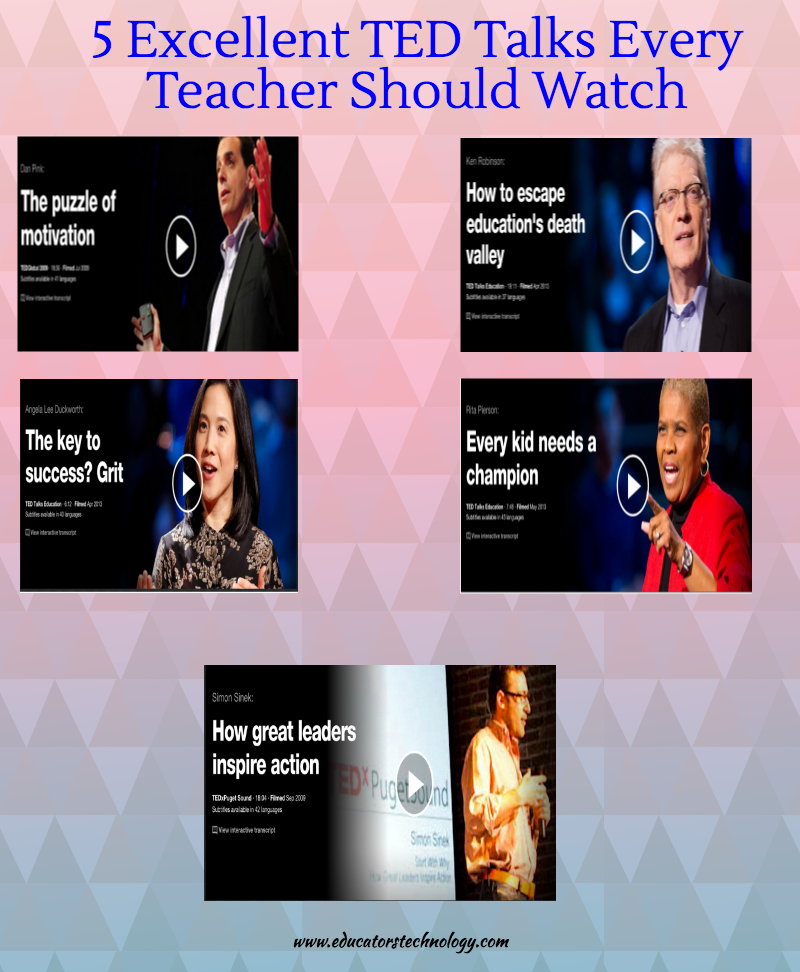
5 Excellent TED Talks Every Teacher Should Watch - Kang Khoe

TED talks are invaluable resources for teachers professional development. They cover a wide variety of education related topics and provide a very good source of inspiration for teachers and students. Throughout the year we have been sharing with you some interesting talks from renowned speakers and educators and today we have had a look back at those talks and picked out 5 of the most popular talks within the education community.

ted talks

1- Every Kid Needs A Champion by Rita Pierson


Rita Pierson, a teacher for 40 years, once heard a colleague say, "They don't pay me to like the kids." Her response: "Kids don't learn from people they don’t like.’” A rousing call to educators to believe in their students and actually connect with them on a real, human, personal level.

2- How to Escape Education's Death Valley by Sir Ken Robinson 


Sir Ken Robinson outlines 3 principles crucial for the human mind to flourish — and how current education culture works against them. In a funny, stirring talk he tells us how to get out of the educational "death valley" we now face, and how to nurture our youngest generations with a climate of possibility.

3- The Key to Success ? Grit by Angela Lee Duckworth


"Leaving a high-flying job in consulting, Angela Lee Duckworth took a job teaching math to seventh graders in a New York public school. She quickly realized that IQ wasn’t the only thing separating the successful students from those who struggled. Here, she explains her theory of “grit” as a predictor of success."

4- How Great Leaders In spire Action by Simon Sinek 


"Simon Sinek has a simple but powerful model for inspirational leadership all starting with a golden circle and the question "Why?" His examples include Apple, Martin Luther King, and the Wright brothers..."
5- The Puzzle of Motivation by  Dan Pink


"Career analyst Dan Pink examines the puzzle of motivation, starting with a fact that social scientists know but most managers don't: Traditional rewards aren't always as effective as we think. Listen for illuminating stories — and maybe, a way forward."

A Very Good Collection of Academic Search Engines for Teachers - Kang Khoe

Wikipedia has this comprehensive list of major academic databases and search engines. This list has over 50 titles neatly organized based on the discipline they target. From sociology to agriculture, almost all disciplines are covered. These search engines are especially useful for teachers, educators, and academic researchers looking for  a quick access to  articles published in academic journals and other scientific publications. These kind of documents and articles do not normally have a high visibility in normal search engines. You might want to book the page and keep it handy to use whenever needs be.

Click here to check the original list.


 Follow us on : Twitter, Facebook , Google plus, Pinterest .
Minggu, 02 Oktober 2016

9 Good iPad Apps to Enhance Kids Mathematical Thinking - Kang Khoe

Below is a set of good iPad apps that you can use with your kids and students to enhance their mathematical thinking. These apps are meant for young learners and are specifically useful when introducing kids to those rudimentary notions of mathematical computations. The purpose of teaching kids to think mathematically, as detailed in Kaye Stacey's paper, is three folds: First, it will allow kids to conduct mathematical investigations by themselves. Second, it will help them acquire other thinking skills particularly problem-solving and as mathematician Paul Halmos (1980) stated, 'problem solving is the heart of mathematics'. Third, it helps kids get a deeper appreciation of mathematics and use it in their daily and working lives.


1- Hands-on Math Hundreds Charts
Hands-On Math: Interactive Hundreds Chart creates a virtual math playground where students explore, investigate and discover mathematical concepts. Students use colored markers on the Interactive Hundreds Chart to represent patterns and number sequences.

2- Sushi Monster
Strengthen reasoning strategies for whole number addition and multiplication by helping monsters make a target sum or product. Earn points with each correct answer… but watch out for distractions! To be successful, plan ahead and strategically select numbers from the sushi counter.

3- Math Flash Cards
Designed for people of all ages, Math Flash Cards Multiplication is an app that allows the user to practice simple basic multiplication facts or extend the users ability to work out complex multiplication problems up to three digit numbers. Users can control the number of digits used to generate the problems. From one digit to three digits can be seclected by the user. Users also can control the number of questions given during one session.

4- Meerkat Math

Designed and programmed by two former high school teachers, Meerkat Math is more than just a runner game. Every level is packed full of questions that entertain and enlighten. Complete missions by running through eight mini-games on an island packed full of challenges. Play and level up to unlock all 8 modes.

5- Think 3D Free
Explore and interact with 3D shapes on a screen like you never have before. Some of the features it provides for users include:
  • Choose from of a variety of 3D shapes
  • Create unlimited combinations with colorful solids
  • Add or remove solids with a single tap
  • Drag one finger to rotate 3D images in any direction
  • Zoom in and out for a better view
  • Swipe to spin in any direction
  • 3D creations saved in documents
6- Number Pieces Basic
Number Pieces Basic helps students develop a deeper understanding of place value while building their computation skills with multi-digit numbers. Students can use the number pieces to represent multi-digit numbers, count, regroup, add, and subtract. The drawing tools allow students to label representations and show their understanding.

7- Everyday Mathematics
Players take turns dealing two 2-digit number cards to each player, finding their differences, and then comparing the differences. Players score points for correctly finding their difference, identifying the greater difference, and for having the greater difference. The player with the most points at the end of 8 rounds wins! Visual and audio reinforcement of correct and incorrect answers help players master subtraction computation and comparison skills.

8- My Matt App

My Math App is for mastering basic elementary math facts. Its an easy to use and customizable application to enable focused learning.

9- Math Heroes
With Yogome, Inc. learning math is a blast. Math Heroes 1-Basic Operations puts a martial arts twist on elementary-level arithmetic. Unlike straightforward memorization and drilling, Math Heroes 1 engages multiple parts of the brain, improving speed, comprehension, and retention of concepts. If you’re looking for an alternative to traditional teaching methods, Math Heroes is a great way to get ahead of the learning curve.

4 Easy Ways to Effectively Integrate Technology in Education - Kang Khoe

In an earlier post we shared here a few months ago, we talked about the differences between technology use and technology integration and we argued that integrating technology in instruction is a principled process that requires deep and reflective thinking about the whys behind such integration as well as  the learning outcomes expected from such integration.

The visual we have for you today will assist you to better integrate technology in your classroom projects. This visual, created by UBC Learning Commons, outlines the basic steps in the process of integrating technology in your class. The first step in this process is to identify the requirements of the project for which you want to use technology. Then comes the phase where you need to consider the skills you possess or planning to develop to carry out this digital task. The third phase is where you start looking for the specific technological tool to use and the last step is about finding resources.

You can also watch this video to learn more about the aforementioned steps. Enjoy


Here is the visual from UBC Learning Commons
technology integration steps 


 Follow us on : Twitter, Facebook , Google plus, Pinterest .

Sabtu, 01 Oktober 2016

5 Powerful Speech to Text Apps for Chrome Users - Kang Khoe

Speech to text technologies allow you to transcribe your speech into text in a couple of clicks. Most of the established platforms integrate this kind of technology. For instance Google has it integrated with some of its services like Google search. You can click on the mic icon in the search bar and start speaking, Google will automatically type in your speech and run your query. Below are some of the Chrome apps for speech recognition. Check them out below.

1- Announcify

Announcify reads out loud various kinds of information, like events or whole documents, for you. For example, if you're too tired but still need to study one more Wikipedia entry, Announcify can help your tired eyes relax.

2- Select and Speak


Select and Speak uses iSpeech's human-quality text-to-speech (TTS) reads selected text. It includes 43 iSpeech text to speech voices. You can configure the voice and speed options by changing the settings on the options page.


SpeakIt reads selected text using Text-to-Speech technology with language auto-detection. It can read text in more than 50 languages.


Dictanote provides you with a advanced rich text editor with an inbuilt multi-language speech recogniser. The latest version of Dictanote features QuickType, a faster than ever speech recognition engine using which you can actually write faster than normal typing.


The app is integrated with Dropbox and Google Drive so you can easily export you transcribed text to your various online accounts. Or your can send the text to any email address. Dictation uses Chrome's Local Storage to save the transcriptions and thus you'll never lose your work. There's no need for the Save button.
 Follow us on : Twitter, Facebook , Google plus, Pinterest .

An Excellent Rubric for Science Teachers - Kang Khoe

In today's post I am sharing with you an excellent rubric for science teachers. This document, which is available for free download, is shared by the University of Wisconsin. The rubric  outlines performance criteria for using : scientific tools, scientific reasoning and strategies, science concepts and use of data and communication. The performance is assessed for each of the following categories: novice, apprentice, practitioner, and expert.


Click here to download the rubric. You can also check this page for rubrics covering other subject areas such as writing, cooperative learning, math, social media, oral presentations and many more.
 Follow us on : Twitter, Facebook , Google plus, Pinterest .